WordPress permissions are one of the most important, and often overlooked, parts of securing a website. Even if your themes, plugins, and core files are fully updated, weak file ownership or overly permissive settings can still leave your server exposed to unauthorized changes, malware injection, or complete site takeover. Understanding how permissions work, how ownership affects access, and what safe settings look like can dramatically improve your server security and reduce the risk of costly incidents.
Why WordPress permissions matter
Every file and folder on a WordPress installation has permissions attached to it. These permissions determine who can read, write, or execute each item. In practical terms, they control whether your web server, your system user, or other accounts on the server can modify content.
When permissions are too open, an attacker who gains limited access may be able to alter PHP files, inject malicious scripts, or replace core files with harmful code. When permissions are too restrictive, WordPress may not be able to update itself, upload media, or save configuration changes. The goal is to find the right balance: enough access for WordPress to operate normally, but not enough to make exploitation easy.
Understanding WordPress permissions and file ownership
Permissions and ownership are related, but they are not the same.
Permissions define what actions are allowed on a file or directory. Ownership defines which user and group control that item. On most Linux-based servers, ownership matters just as much as the numeric permission settings because the owner can often change files more easily than other users.
For WordPress, the ideal setup is usually one where the files belong to the correct system user that runs the site, and the web server process has only the access it needs. Problems often occur when all files are owned by root, when multiple sites share the same owner unnecessarily, or when the web server itself has write access to sensitive files that should remain protected.
Recommended file and directory permissions
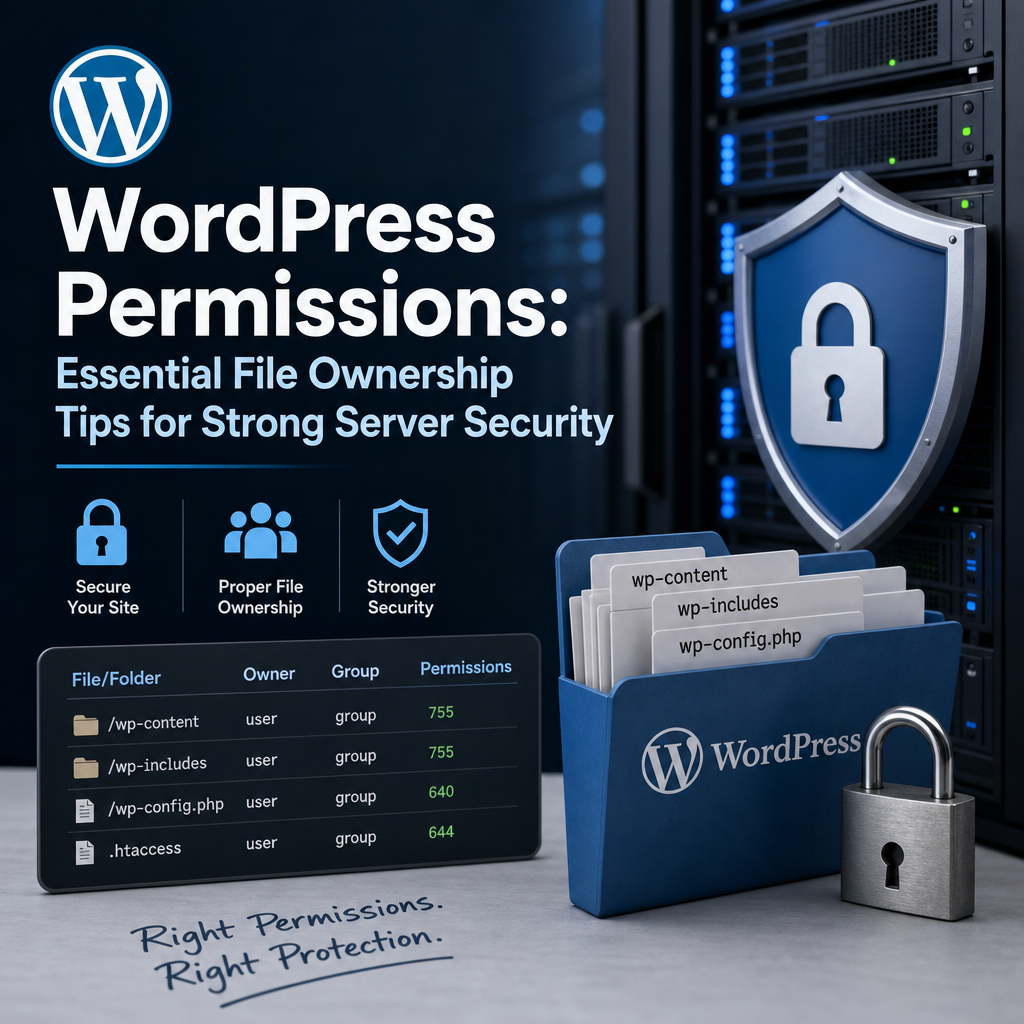
A common and secure baseline for WordPress permissions is:
– Files: 644
– Directories: 755
– wp-config.php: 640 or 600, depending on your server setup
These values usually allow WordPress to function while limiting unwanted write access. Files set to 644 can be read by the owner and others, but only written by the owner. Directories set to 755 can be entered and listed, but only modified by the owner. The wp-config.php file deserves extra protection because it contains database credentials and security keys.
Some environments may require slight adjustments, especially managed hosting platforms or servers with special PHP handlers. However, setting files to 777 or directories to 777 is almost always a serious security risk. Those permissions allow nearly anyone on the system to write to the item, which can create an easy path for compromise.
The role of proper file ownership
Good WordPress permissions are not enough if file ownership is wrong. If the wrong user owns the site files, WordPress may either fail to update correctly or be forced to run with broader access than necessary.
A secure ownership model usually means that the website files are owned by the account that manages the site, not by root. Root ownership can be appropriate in some deployment workflows, but for many WordPress installations it creates unnecessary friction and can lead to insecure workarounds. Likewise, if multiple sites on the same server share one owner, a vulnerability in one site can sometimes be used to affect others.
A safer approach is to assign each WordPress site its own dedicated system user whenever possible. This limits the damage if one account is compromised and helps keep server security boundaries clear.
How WordPress permissions affect server security
Weak permissions can expose your site in several ways.
First, attackers may modify plugin or theme files to add hidden malware. Because these files are executed by PHP, malicious code can persist even after a routine scan if it is embedded carefully.
Second, open write permissions can let attackers alter wp-config.php or .htaccess, which may expose sensitive information or redirect traffic to unsafe pages.
Third, poor ownership combined with world-writable directories can allow one compromised account on the same server to tamper with another site. This is especially dangerous in shared hosting or poorly isolated VPS environments.
Finally, over-permissive settings can make backups, cache folders, and upload directories an easy target. Even if the attack begins in a non-critical location, it can still be used as a foothold for deeper compromise.
Practical tips for securing WordPress file ownership
A secure permissions strategy starts with good ownership practices:
1. Use a dedicated user for each WordPress site.
2. Avoid giving root ownership to site files unless your deployment workflow specifically requires it.
3. Keep the web server process from having unnecessary write access to application files.
4. Restrict write access to only the directories that truly need it, such as uploads or cache folders.
5. Review ownership after migrations, restores, and staging-to-production deployments.
If you move a site from one server to another, ownership can easily be set incorrectly during file transfers. This is a common issue after backups are restored with tools that preserve the original owner IDs from a different system. Always verify ownership after a migration rather than assuming it is correct.
Protecting sensitive WordPress files
Some files deserve extra attention beyond standard permissions.
The wp-config.php file is the most important because it contains database connection details, authentication salts, and other critical settings. Restrict it as much as your hosting environment allows. The .htaccess file, when used, should also be protected because it can control redirects, access rules, and URL handling.
PHP files inside the wp-content directory deserve scrutiny as well, especially within plugins and themes. If a file in these areas becomes writable by the wrong user, an attacker may inject code that runs whenever a page loads.
Uploads directories should be writable by WordPress if you need to add media, but they should not allow executable PHP files where possible. Blocking PHP execution in upload folders is an excellent defense-in-depth measure.
Common mistakes to avoid
One of the biggest mistakes site owners make is assuming that more write access means fewer maintenance problems. In reality, excessive permissions usually create security problems that are far harder to fix than a slow update process.
Another common error is using 777 to “make it work” when uploads fail or updates are blocked. This may solve the symptom temporarily, but it creates a major vulnerability. A better solution is to correct ownership, adjust server configuration, or review PHP-FPM and web server user settings.
A third mistake is giving every site on a server the same user account. This simplifies management, but it also removes isolation. If one site is compromised, the attacker may gain access to all files owned by that account.
Finally, many administrators forget to check permissions after installing new plugins, restoring backups, or running deployment scripts. Automated tools can sometimes apply unsafe modes without warning, so periodic reviews are important.
Best practices for ongoing server security
Strong server security depends on routine maintenance, not one-time setup. Review your WordPress permissions regularly, especially after major changes. Monitor file integrity so you can spot unexpected modifications. Keep software updated, including plugins, themes, PHP, and the underlying operating system.
If your hosting environment supports it, use security tools that alert you to permission drift or suspicious file ownership changes. This can help you catch problems before they become serious incidents.
It is also wise to limit who has shell access to the server. Even well-configured permissions can be undermined if too many users have login rights. Combine least privilege with strong passwords, multi-factor authentication, and regular backup testing for a more complete security posture.
Final thoughts
WordPress permissions and file ownership are foundational to server security. They influence who can change files, where attackers may gain leverage, and how safely your site can operate day to day. By keeping permissions tight, assigning ownership correctly, and avoiding dangerous shortcuts like world-writable files, you create a much stronger defense against common WordPress attacks.
A secure WordPress site is not built on updates alone. It is built on layered protection, and file ownership is one of the layers that should never be ignored.